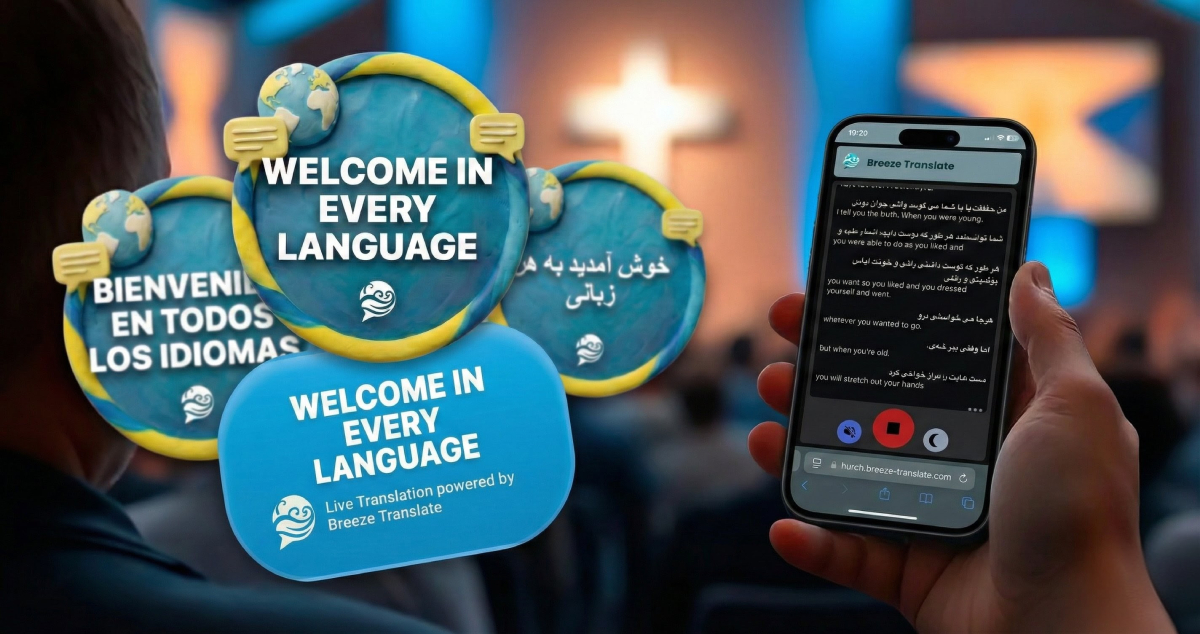
Two Sundays ago we had a group of Farsi speaking Christian refugees start attending our services. Another church had emailed to say they were being moved to our town and recommended Breeze Translate as a church focused translation app.
A quick signup at breezetranslate.com and we got a URL for people to browse to view the translation.
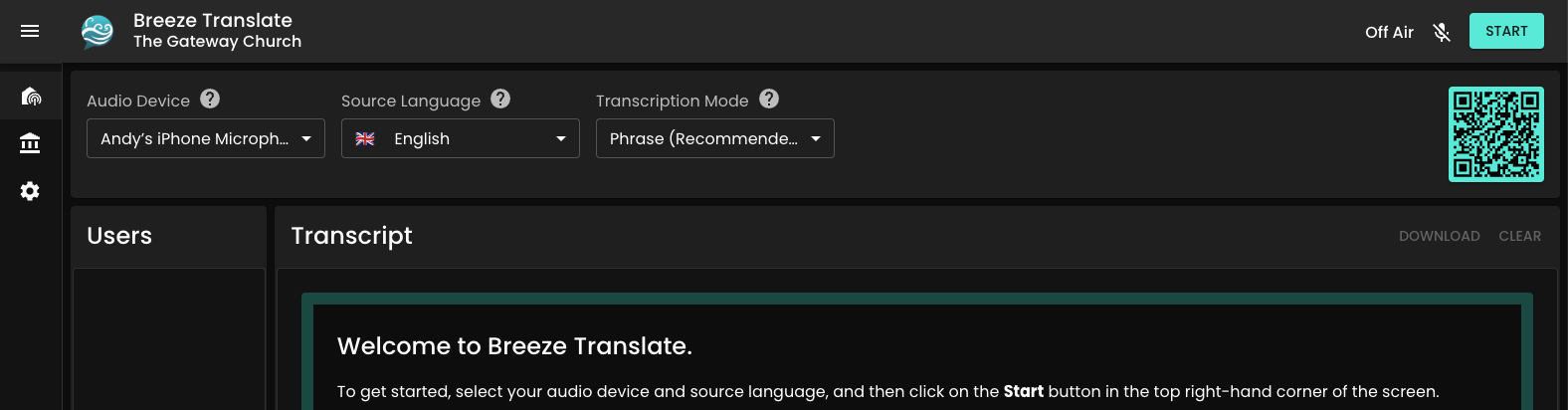
On Sunday, we plugged our mixer into the laptop and browsed to control.breezetranslate.com. We gave out the translation URL to our new Farsi speaking friends and others who have English as an additional language.
It instantly picked up the audio options and all I needed to do was click Start. We selected the default “phrase” transcription mode – which meant the lag is low and accuracy is high.
It works brilliantly!
I’d looked at a few options and most are super expensive.
Breeze seems to be the cheapest and works well, so I highly recommend it if you are welcoming people from other nations. We’ve ended up going for the mid-priced options as we needed 6 languages each Sunday we have been trialling it.
I log all my church mileage, visiting people, meetings, conference, every single mile – which is all tax deductible in the UK.
So a while back I created simple mileage tracker app, to allow me to enter mileage, journey reason and the date and then get monthly or annual PDF and CSV for either claiming or putting on my tax return. It has saved me hundreds in tax each year!
Some users track their fuel economy too – the app allows you to do that with miles/kilometres and US Gallons/Imperial Gallons or Litres. You can find out more and go to the App Store link at www.simplemileagetracker.com. This app is a one off purchase – all the other mileage apps I know of have expensive subscriptions attached.
A recent survey in the UK found that 67% of Christians find it hard to share their faith.
We are called to make disciples, but often getting out of our Christian bubble to share life with non Christians, sharing our something of our faith and sharing Jesus is hard! When things are hard, they become less of a priority. The best way to make something happen in your life is to write down what you want to do,when you want to do it by and then set a reminder! That is exactly what ACTS is for.
You can set ACTS to
Share life – taking steps to build genuine relationships with people who don’t yet know the Lord.
Share faith – taking steps to bring faith into your friendships, by for example sharing your story, offering prayer or mentioning church as part of what you did last weekend.
Share Jesus – taking steps to invite your friend to encounter Jesus.
Here’s an introductory video explaining more…
The feature is available on the Our Church App and as a shortcode or block from Premium version 5.1.47.
Here’s some more videos explaining how to do each step of share life, share faith and share Jesus.
The ACTS tool is available with the premium version of the plugin and on the app. For a full list of what going premium will do – please check our the feature comparison page.
We have price points for subscriptions to suit small and larger churches, making Church Admin the most cost effective way to use technology to serve your church.
I have made a few changes to the module permissions in Church Admin.
For example the “Bulk Email” permission is split into “Bulk Email”, “Bulk SMS” and “Push”.
When upgrading to v4.5.0, please check Church Admin / Settings / Roles or Permissions to make sure they are what you want them to be! Administrator level logins can still do anything.
WordPress powers more church websites than any other platform — and one of its greatest strengths is the plugin ecosystem. The right plugins turn a basic church website into a full church management system, complete with online giving, sermon podcasting, a member directory, event booking, and more. Here are the best WordPress plugins for churches in 2026, covering every category you need.
Church Admin — Best overall church management plugin
Church Admin is the most complete church management plugin for WordPress. Rather than replacing your website with a separate system, it extends it — adding a member directory, rota, giving forms, sermon podcasting, small groups, event ticketing, calendar, email and SMS communications, and a mobile app, all running inside your existing WordPress site with your data on your own server.
Free version includes
People and household directory with shortcodes
Self-registration form for new members
Sermon library and podcast RSS feed
Interactive calendar
Members-only content shortcodes
Premium adds
Online giving with Stripe and PayPal
Rota and volunteer management
Small groups, classes, and oversight
Ticketed event management
Email and SMS to filtered groups
Child protection incident reporting
UK Gift Aid support
Our Church mobile app for iOS and Android
Follow-up funnels for visitor integration
Why it’s different: Most church management software is a separate web application you import your data into, often with per-user fees. Church Admin runs inside WordPress, which means your congregation’s data stays on your own server, members log in through your existing website, and there are no per-user charges. The free version is available on the WordPress plugin directory.
Church Admin includes a full sermon library and podcast RSS feed in the free version. Upload MP3 files, link to external audio from Amazon S3 or SoundCloud, organise sermons into series, and submit the feed to Apple Podcasts, Spotify, and Amazon Music. Shortcodes and Gutenberg blocks embed the sermon archive and individual sermons anywhere on your site.
Church Admin Premium — Best integrated giving for churches
Church Admin Premium includes Stripe and PayPal giving forms with multiple fund management, recurring giving, pledge tracking, donation receipts, and UK Gift Aid support with HMRC-compatible reporting. Because giving is integrated with the member directory, you can produce per-person giving statements and run Gift Aid reports without any extra tools.
GiveWP is the most popular dedicated donation plugin for WordPress with over 100,000 active installs. It supports one-time and recurring donations, multiple payment gateways, and donor management. A good option for churches that want giving functionality without a full church management system.
Church Admin Premium — Best for ticketed church events
Church Admin Premium includes a full ticketed event system — multiple ticket types, free and paid tickets, capacity limits, online booking forms, a bookings CSV and PDF, on-the-day check-in, and the ability to email everyone who has booked. Because it’s integrated with Church Admin’s giving module, paid tickets work with the same Stripe or PayPal gateway you already use for donations.
The Events Calendar — Best free events display plugin
The Events Calendar by Modern Tribe is the most widely used events plugin for WordPress with over 700,000 active installs. It displays events in a calendar or list view, supports recurring events, and integrates with Google Calendar. The free version handles event display well — ticketing and advanced features require paid add-ons.
Church Admin includes a built-in contact form with robust multi-layer spam protection — no CAPTCHA needed. Messages are saved to the database, emailed to a nominated recipient, and optionally sent as a push notification to the Our Church app. The form shortcode or block can be placed on any page.
Contact Form 7 is one of the most installed WordPress plugins of all time, with over 10 million active installs. It’s simple, flexible, and free. Build forms with a basic markup language, embed them with a shortcode, and receive submissions by email. A reliable fallback for any church that needs a general-purpose enquiry form without a full plugin suite.
WPForms is the most beginner-friendly form builder for WordPress. A drag-and-drop interface makes building forms quick, the free Lite version handles most church use cases, and the paid version adds payment forms, surveys, and integrations. A good choice for churches that want to build multiple different forms — registrations, volunteer sign-ups, feedback — without writing any code.
UpdraftPlus is the most trusted backup plugin for WordPress with over 3 million active installs. Back up your database and files automatically to Dropbox, Google Drive, Amazon S3, FTP, email, or a range of other destinations. Restore in three clicks. The free version covers everything most churches need — schedule weekly backups to a cloud destination and know you’re covered if anything goes wrong.
Church website databases contain personal data, giving records, and pastoral notes. A current backup is not optional — it’s essential.
Sucuri monitors your WordPress installation for signs of compromise — modified core files, suspicious code, malware. The free version includes file integrity monitoring, hardening recommendations (including disabling the plugin and theme file editor), and an access log showing what users have done. Email alerts notify you of plugin activations, theme changes, and other significant events.
Church websites are targeted by the same automated attacks as any other WordPress site. A security monitor that tells you if something is wrong before your congregation notices is well worth having.
Rank Math is a powerful free SEO plugin that helps your church website appear in search results. It handles meta titles and descriptions, generates a sitemap, adds structured data, integrates with Google Search Console, and provides per-page SEO guidance as you write. A good choice for churches that want solid SEO without a complicated setup. Yoast SEO is an equally reputable alternative with a longer track record.
If you prefer a dedicated sitemap tool rather than an all-in-one SEO plugin, the XML Sitemap Generator creates a styled sitemap and notifies major search engines automatically. Configure which post types to include and let it run in the background. Free for everyone.
Google Site Kit connects your WordPress dashboard to Google Analytics, Search Console, PageSpeed Insights, and AdSense in one plugin. See which pages get the most visits, how long people stay, and what they searched for to find your site — all without leaving WordPress. Useful for understanding what content your congregation and visitors actually engage with.
Pray for the Nations is a free plugin that helps your church pray for the world. It pulls country demographics from public data sources and links to Operation World prayer points for each country — keeping the content up to date without any manual maintenance. Add a country widget or shortcode to any page to encourage global prayer in your congregation.
Church Admin is the most comprehensive free church WordPress plugin, including a people directory, sermon podcasting, and calendar shortcodes. For security, Sucuri is free and widely trusted. For backups, UpdraftPlus has an excellent free tier that covers most church needs.
Not necessarily. Church Admin turns your WordPress website into a full church management system — managing your directory, rotas, giving, groups, and communications from within WordPress, without a separate subscription to a third-party ChMS. Your data stays on your own server rather than a vendor’s cloud.
Church Admin Premium includes Stripe and PayPal giving forms with fund management, recurring giving, and UK Gift Aid support. GiveWP is a popular standalone giving plugin for churches that want donation forms without a full management system.
Yes — Church Admin includes a sermon library and podcast RSS feed in the free version, compatible with Apple Podcasts, Spotify, and Amazon Music. No separate podcast plugin is needed.
Church Admin Premium includes full ticketed event management with free and paid tickets, capacity limits, on-the-day check-in, and the ability to email all bookers. The Events Calendar is a popular alternative for event display without ticketing.
Install an SEO plugin such as Rank Math or Yoast SEO, connect Google Search Console through Google Site Kit, and ensure your site loads over HTTPS — most hosting providers include a free SSL certificate. Publish regular content such as sermon notes, event pages, and news to give Google more to index.
Quality matters more than quantity. A church site with 8–12 well-chosen plugins will perform better than one with 30 poorly maintained ones. Prioritise: one church management plugin, one backup plugin, one security plugin, one SEO plugin, and a contact form. Everything else depends on your church’s specific needs.
CRM software allows companies to manage relationships with customers. Many church members will use them in their everyday work. Churches don’t have customers! But they do need to manage relationship with their congregations and visitors. Thankfully there are church specific CRM tools out there, generally called Church Management Software comes in – a CRM specially designed for churches!
Managing a church requires you to be able to track attendance and giving, schedules services and classes, organise volunteers, communicate with members and organise special events and much more.
In 2024 you’ll want a Church management software (ChMS) that is cloud based, so staff and volunteers can access and use it and preferably with desktop and app versions.
Here are our top 3
Planning Center
Planning center starts with a database of people and then you can add on the options you require, making it scalable as the church grows.
The software includes modules for managing:
People
Events
Services
Giving – you are charged for monthly donations, starting at $14pm for 75 donations (Credit card fees are on top)
Price range $0 – $1293 per month
Breeze
Has modules for people, groups, check in, giving, messaging and service planning.
It integrates with MailChimp for sending email and QuickBooks for finances.
The Web based software
Manage their databases
Create groups
Send and schedule email and SMS text messaging
Offer online and text message giving
Generate contribution reports
Set up event registration and manage volunteers
Securely check-in children and print name tags
Price $72 per month whatever your church size.
Church Admin Plugin
Church Admin is a comprehenseive Church Management System for churches of all sizes. It bolts on as a plugin to a Church’s WordPress powered website. WordPress is the most popular website system.
Church Admin starts with people – the address list of everyone connected to your church whatever their membership level from first time visitor to member. You will be able to track their integration and send email or SMS to any group, team or individual in the list.
Price range $0 to £99 per year.
The free version allows you and your users to manage your address list, calendar and sermon podcasting.
The premium version allows your users to manage your address list, calendar, rotas (schedules), communication tools, sermon podcasting, , plus the Our Church app, child protection, online PayPal and Stripe giving forms and more. A premium subscription is $99 per year. Small churches under 50 people can purchase a lifetime licence for $30.
The Church Admin plugin is ideal if your church website uses WordPress and all the data is stored securely in your website database.
The only thing missing compared to the other solutions is service planning and that is in the pipeline for 2025.
Get the free manual now with this form…
Or even better subscribe to the premium version paying monthly, quarterly, annually or a lifetime licence…
Church Admin Plugin is around 12 years old now and its time to give it a more sustainable future with a change of pricing.
Current premium licence holders won’t be affected by the change.
But from now on, everyone who already has the free plugin or install it will get a 28 day trial of the Standard version. You can stay on the Standard version for USD $40p.a. or downgrade to the free version, which now only offers the People module so you can organise your church directory.
The premium version adds the Our Church app, the Pastoral visitation module, PayPal and Stripe giving for USD $129 p.a.
This change will make developing maintaining and supporting users more sustainable for the long term!
Free Version
The free version includes the People module.
Standard Version
On first installation, you will have a 28 day trial of the Standard version with no card details required.
Including the People module
And these modules…
Age Related Groups
Attendance
Calendar
Classes
Communication tools
Contact form
Events – free ticketing only
Facilities
Follow up funnels
Inventory
Key dates module
Media
Ministries
Units
Spiritual Gifts
Small groups
Sites and Services
Schedule (Rotas)
Sessions
Upgrade now or from your Church Admin main page…
Premium Version
The Premium version includes all the standard features and
App with full administrator features – The Our Church app, puts church life on people’s devices. The Our Church app is a simple to configure app available free in the iOS, Google Play and Amazon app stores.
Pastoral Visitation module – track and log pastoral visits.
Schedule availability – users can set their availability,
Some Android users off the app have been reporting the app getting stuck on a blank page with Home at the top. And others get an “Oops – perhaps Church Admin needs updating or the website is down” message
If it’s the blank page issue…
Somehow the cached data has got corrupted. Clearing app data for Our Church will fix.
Step 1: Open the Settings application on your device.
Step 2: Head over to Apps Menu.
Step 3: Choose Installed Applications.
Step 4: Find the Application you want to Clear the App Data of.
Step 5: Select it, Move to the Storage Tab.
Step 6: Hit Clear Storage/Clear App Data.
If it’s the other error…
This seems to have only affected some devices, especially on completely closing the app or restarting the device. It’s a bug where the device registers to receive push notifications before the app is able to connect to the internet. That’s fixed for v28.6 which should be online overnight.
Recently I have had a rash of registrations that are obviously not real people – spam registrations. I am utterly sick of spam! So I decided to do something about it.
Akismet doesn’t stop spam registrations, only spam comments and it’s quite expensive. I’d swapped to AntiSpamBee for their free comment spam plugin which was brilliant, but again that wasn’t stopping registrations by spammers.
I spent some time researching and came across CleanTalk – which protects registration forms, contact forms, comment forms and seems to do so brilliantly!
There’s a 7 day free trial and then it is only $8 pa for the basic package. I have had no more Russians with lots of random letters and numbers registering on the site. It also allowed me to check current users against known spam IPs an email addresses – so another 49 users were culled.
The site dashboard shows you how well it is working. This is my first 24 hours…
You can also check exactly what has been blocked and denied and correct any false positives (none so far!)
I am very happy to recommend the service – the image below is an affiliate link
Today someone sent me a screenshot of the prayer request form from their website – it looked awful!
It’s a nice clean theme, but this page looks awful.
What can you do? Depends on how confident you are with html!
If you right click and then inspect on the page, you will be able to see the HTML and CSS.
This theme has placed it correctly just above the first article. And above the little bit of Prayer request form code is a tag called “Main”. Notice that there is the word flex in a bubble next to it. That told me that it is a flexible layout!
So now we need to make the prayer request section fill the width and the other content needs to go underneath.
One of the nice features of WordPress is the Customizer, which allows you to make tweaks live.
Login to your dashboard and click on Customize. Then click on Additional CSS.
What we need to do in this case is make all the articles work on flex-wrap basis and then the form can be set to 100%.
When the numbers are computer program versions! And that is why some of you haven’t been able to update Church Admin plugin for a while!
Today I learned that computer program numbers are three numbers separated by 2 dots…
The first number is the major version, the second number is minor version and the third number is an update.
They are not decimal numbers so 2.7763890 is greater than 2.778000 because even though they are both major version 2. The second part of the version number – 7763890 is bigger than 778000.
There you go.
Church Admin is now at 3.0.0 not because it is a major version upgrade, but because my old numbering was messy and changing the major version is a quick fix. The new logo many of you will now see for the first time is the upgrade 😉
When you first install the Church Admin plugin, the default is that only users with “administrator” role can access the backend admin area.
Any users created by registering/editing the address list are given a very basic “subscriber” role – they cannot create posts or pages etc.
There are two ways of allowing access to parts of the Church Admin backend,other than administrators.
Roles
If you go to Church Admin>Settings> Roles you can set different modules of the plugin to be accessed by different roles (like subscriber, author, contributor, editor, administrator). By default the plugin has these set to administrator (in practice anyone who is allowed to manage_options) This is easiest and safest!
Permissions
If you want to grant access to certain parts of the plugin, but not allow people to be able to post, then name based permission is the way to go. Firstly the people need to have their directory entry tied to their user account. The head to Church Admin>Settings>Permissions
Type in people’s names for the different items and click save at the bottom. NOTE: Administrators can always access everything.
If it all goes wrong, then you can check “Delete all user permissions” and click save, to reset back to roles based access.
So this evening I got in touch with a web client who had not paid an invoice I’d sent him by email in January. I used WhatsApp to ask if he was not an email guy? The image above was his reply. I’m pretty sure that is the Guiness World Record for the most unread emails! Needless to say I sent the invoice by WhatsApp and it will be paid tomorrow 😉
So I asked around and here are two more screenshots friends sent me…
So your church emails are probably stuck in people’s unread email inboxes.
For the important stuff we use Bulk SMS and push messaging via the app you can get for Church Admin Plugin.
Today’s church admin plugin update makes a usability tweak to the “church_admin_register” shortcode and block. The first step of entering the email address and clicking next step will check if it’s a returning user or registration and offer the next step. A confirmation email will be sent on saving and a subscriber user account is created on email confirmation – this allows the user to edit themselves.
Under the hood registration is also enabled on the app – when an a non-logged in app user goes to Account they will be able to register basic details. They will get a confirmation email which will then lead to a user account.
The admin email account is warned of registrations and edits!
You can now target push notifications using the normal filter – they will go to logged in app users who match the filter conditions. The Black Friday offer of a lifetime one-off payment of $99 for your church to subscribe has ended but I have forgotten to up the price if you start from Church Admin>App on your website! I’ll get round to it next update 😉 The app is free for your congregation to install.
Bulk SMS
Some people turn off push notifications too, so when a message is really important and urgent, then the send SMS feature is the way to go! It’s just more expensive. I have added Twilio as an SMS provider – they have a referral offer of $10 credit when you add $10 credit starting from this link, which is also on the SMS settings page. Messages are pretty cheap, but you do have to buy a mobile number from them at $1 (£0.74) per month. I’m working on handling replies – that’s coming soon. The other providers in the plugin still want, but someone requested Twilio and helped with some code!
Sermon Podcast page
I’ve fixed some dropdown menu issues some were having in the latest update 2.7016.
I’ll never forget that Sunday. It was a year or two into leading my first church plant. I was in a lot of pain from a slipped disc still and no-one turned up to set out the chairs, or do the P.A. I’d forgotten my mobile (it was in the days when they only made calls and texts!) and so I begun to struggle putting out chairs and setup the sound gear ready to lead worship.
The small group leader on duty hadn’t checked our rota (schedule) or their email and so hadn’t arranged for people to help. The PA guy had gone on holiday and forgotten to tell anyone.
As I was struggling with some chairs some first time visitors showed up early (because that’s what visitors do!) I was mortified, but very grateful for the help, thinking they will never come back. Thankfully, just the opposite happened. They were thinking this guy needs the help and they wanted to serve. Within weeks, she ended up running a kids and he led the PA team and played ina worship band. God is good!
That Sunday wouldn’t happen now. Volunteers get an email reminder, or SMS if they prefer and they can look at the app to see when they are doing what.
I’d love you to have a that sunday where quality visitors turn up who can help you get on with the mission. But not That Sunday! You can avoid it with Church Admin plugin organisation and communication tools and by getting the app in your church.
I’m currently offering a lifetime church subscription for a one-off payment of US$99 – other currencies are available. Current monthly/annual subscribers can get in on the offer too!
Sale Price: USD $99 – you can change the currency below.
I hate getting spam, it’s such a time waster! But I do want genuine contacts here and on my church website that aren’t trying to grow body parts, get me better SEO or design a website for me!
There’s a couple of things that you can do to help stop spam and make it easy for people to get in touch from your website.
I don’t put my email address on websites as that guarantees that you get on spammers lists.
Install a contact form plugin. The problem with most of them is that the emails can still disappear into spam folders
So I created the “Never Loose Contact Form” plugin. It uses some standard tricks to weed out spammers, including spammy words in the message, filling out the honeypot hidden field (bots just love to fill all the form fields), too many links in the message (hey, one is enough!) and a few more that I’ll keep hush hush!
To make sure you don’t miss a message, they are saved in the Database as well as being sent to you by email.
There’s a widget, a block and a shortcode to use on the front end of your website.
As you can see I have been protected from 54 spam messages since the weekend, which is just great!
Occasionally you will need to reset everyone’s password to make sure your site is staying secure. I created an emergency password reset plugin some years ago that does that and emails everyone to let them know.
It can also change SALTs too – they are random gobbledygook that are used to salt sensitive data before encrypting it for extra security.
It’s available FREE on the WordPress plugin repository or search “Emergency Password reset” from Dashboard>Plugins>Add Plugin.
Sometimes I want to edit our schedule/rota/roster quickly, so I’ve restored the inline editing feature and made it zing. Click an entry to make it editable. Hope you like it.
On the front end users can pick a service and month easier too.
No longer the early adopters!
On of our best preachers is in his late 70s. While preaching this Sunday he was using a Bible app on his new smartphone. Smartphone use is now way past the innovators, the early adopters, early mainstream and into late mainstream and heading for the laggards! I get that the pace of change can be hard to handle in churches – while some may still be annoyed about that new fangled pipe organ, you are harnessing technology to help the cause of the Gospel – getting it organised with the Church Admin plugin. If you haven’t already, please do take the next step and subscribe your church to the app – your congregation can get it free on their iOS, Android and Amazon devices and it’s just £7.50 per month for the church or $10 if you prefer USD!
Click the button below to get the first month free….
To provide the best experiences, we use technologies like cookies to store and/or access device information. Consenting to these technologies will allow us to process data such as browsing behaviour or unique IDs on this site. Not consenting or withdrawing consent, may adversely affect certain features and functions.
Functional
Always active
The technical storage or access is strictly necessary for the legitimate purpose of enabling the use of a specific service explicitly requested by the subscriber or user, or for the sole purpose of carrying out the transmission of a communication over an electronic communications network.
Preferences
The technical storage or access is necessary for the legitimate purpose of storing preferences that are not requested by the subscriber or user.
Statistics
The technical storage or access that is used exclusively for statistical purposes.The technical storage or access that is used exclusively for anonymous statistical purposes. Without a subpoena, voluntary compliance on the part of your Internet Service Provider, or additional records from a third party, information stored or retrieved for this purpose alone cannot usually be used to identify you.
Marketing
The technical storage or access is required to create user profiles to send advertising, or to track the user on a website or across several websites for similar marketing purposes.