⭐ Premium
Church Admin has two distinct approaches to tracking attendance. You can use them independently or together depending on what level of detail your church needs.
- Aggregate attendance — enter a total headcount for each service. Simple, fast, and produces trend graphs and rolling averages over time.
- Individual attendance — tick off specific people from the directory who attended. More detailed, enables absentee reports and per-person attendance history, and can be done from the admin dashboard or the Our Church app.
Before you start
You need at least one service set up before you can record attendance. Go to Church Admin → Sites & Services to add your services if you haven’t already. See Service schedule.
Finding the attendance screen
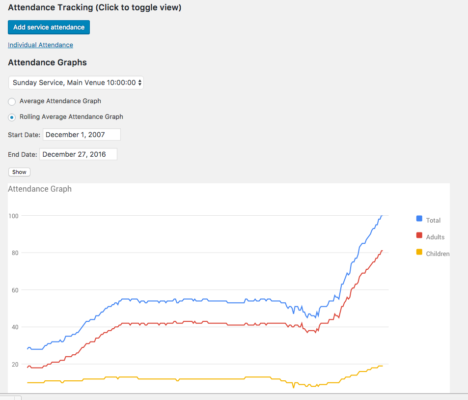
Go to Church Admin → Attendance. The main screen shows a graph of your attendance history once data has been entered, with a rolling 12-month average line alongside the raw weekly figures.

Method 1 — Aggregate attendance (raw numbers)
The simplest approach — just enter a total headcount after each service. Go to Church Admin → Attendance → Add attendance, select the service, enter the date and the number who attended, and save.

The saved record appears in the attendance list and the graph updates automatically. See Enter all your attendances in one go if you need to catch up on a backlog of past services at once.
Method 2 — Individual attendance
Individual attendance tracks which specific people from the directory attended each service. This unlocks more powerful features — per-person attendance history, the absentee report, and individual attendance CSV exports.
In the admin dashboard
Go to Church Admin → Attendance → Add individual attendance. Select the service and date, then tick each person who attended from the full directory list. Save when done.

Via the Our Church app
Individual attendance can also be recorded directly from the Our Church app — useful for a door counter or welcome team member with a phone who can tick people off as they arrive rather than doing it retrospectively. The app syncs the record to the dashboard in real time. See Getting started with the app.
This week’s attendance
Go to Church Admin → Attendance → This week’s attendance for a quick summary of all attendance figures recorded for the current week across all services — a useful at-a-glance check that everything has been entered.
Understanding the rolling average
Each time you save an attendance record, Church Admin also calculates and stores the rolling average of the previous 12 months. The graph shows both the raw weekly figure and the rolling average as a smoother line.
The rolling average is one of the most useful numbers in church ministry. It smooths out seasonal variations — the August holiday dip, the Christmas spike, the post-Easter slump — so you can see whether your church is actually growing, plateauing, or declining beneath the seasonal noise. A rising rolling average over 12 months is genuine growth; a rising attendance one Sunday is just a good Sunday.
What you can do with attendance data
- Absentee report — identify people who haven’t attended for a set number of weeks, for pastoral follow-up. See Absentee report.
- Individual attendance history — pull up the full attendance record for a specific person — all the dates they attended and the services they came to. See Show individual attendance dates.
- Individual attendance CSV — export per-person attendance history to a spreadsheet. See Individual attendance CSV.
Related tutorials
- Enter all your attendances in one go
- Service schedule
- This week’s attendance
- Add individual attendance
- Absentee report
- Show individual attendance dates
- Individual attendance CSV
- Getting started with the app